
When someone nearby searches "coffee shop" or "plumber near me", Google shows a map with three businesses at the top. Those three get most of the clicks. So which three? Google explains it openly: local results are based mainly on relevance, distance and prominence. This guide explains each factor, what you can change, and how to check your own position properly.
Relevance: does your profile match the search?
Google needs to understand what you do. The basics matter more than any trick:
- The right primary category (for example "Coffee shop", not just "Cafe" if coffee is the main thing).
- Services and products filled in, in the words customers use.
- A clear description, correct hours and photos that show the real place.
- Regular posts and updates, so the profile looks alive.
Our free Business Profile checklist covers all of these in 21 ticks. Stay within Google's profile guidelines while you do it: a keyword-stuffed name is the most common reason a profile gets suspended.
Distance: how far is the person searching?
You cannot move your shop, and you should not fake an address. But it explains something that confuses many owners: your rank is different on every street. You might be #1 right outside your door and #14 two kilometres away. A single "I'm ranking #3" check from your own phone tells you very little.
Prominence: how well known and trusted are you?
Prominence is how established your business looks online. Google says it includes your Google review count and rating, plus mentions of you around the web. This is the part you can grow every week: more genuine reviews, good replies, and consistent business details everywhere. The rating calculator shows how many new reviews it takes to move your average.
Check your Maps rank in five steps
- Pick two or three searches customers really type: your main service plus your town, and a "near me" version. Not twenty.
- Open an incognito window on your phone so your own history and visits to your profile do not flatter the result.
- Search from several places: outside your door, your home, the other side of town. Note your position in the map pack and in the full list each time.
- Look at who is above you in the places where you drop off. Compare their primary category, review count, rating and how recent their reviews are.
- Repeat monthly with the same searches and spots, or let a rank grid do it for you, so you can see movement rather than noise.
The full version, with five methods and their limits, is in how to check your Google Maps ranking.
What a rank grid shows
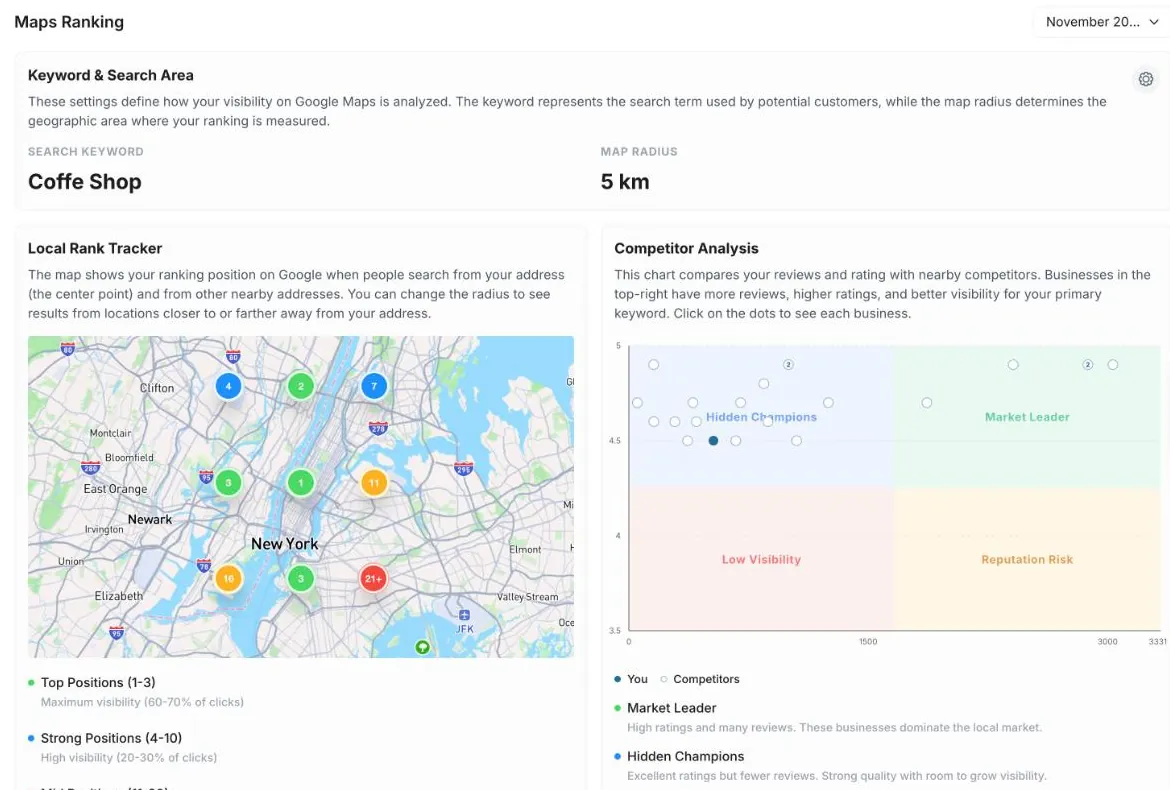
In Localena's Maps ranking screen you choose one keyword (for example "coffee shop") and a radius. Localena then checks the search from points all around your address and puts your position on a map. You see straight away where you are strong and where you disappear.
Next to it, the competitor analysis plots nearby businesses by rating and number of reviews:
- Market leaders: high rating and many reviews.
- Hidden champions: great rating, but fewer reviews. Room to grow.
- Reputation risk: many reviews, weaker rating.
- Low visibility: few reviews and a lower rating.
Most small businesses start as hidden champions. The fastest way to the top right is a steady flow of new reviews, which is what asking every customer does.
A simple monthly routine
- Check your profile basics are correct (category, hours, services).
- Publish a few posts or offers on your profile.
- Ask every customer for a review, and reply to every review.
- Look at your rank grid once a month and see where it is growing.
Questions owners ask
How long does it take to move up on Google Maps?
Profile fixes such as the right category or correct hours can show within days. Prominence grows with reviews and mentions over weeks and months. Compare the same searches from the same spots month to month rather than day to day.
Do more reviews always mean a higher rank?
Reviews are one part of prominence, which is one of three factors. A profile with the wrong category or a hidden address will not rank well however many reviews it has. Fix relevance first, then grow reviews steadily.
Does replying to reviews affect ranking?
Google recommends replying and says engagement signals that you value customers. Treat replies mainly as something the next customer reads; any ranking effect is a bonus, not the reason.
Can I rank in a town where I have no address?
Rarely in the map pack, because distance is a factor and the map pack favours businesses located near the searcher. Service-area businesses can appear for searches across their area, but a profile cannot be created at an address with no staff.
Is paying for Google Ads the same as ranking?
No. Ads can appear above the map pack and are marked as ads. The three organic map results are earned through relevance, distance and prominence and stay when you stop paying.
Why does a competitor with fewer reviews rank above me?
Most often: a better matching primary category, a closer location to where the search was made, or more recent reviews. Check the search from a point near your business and compare categories before assuming reviews are the reason.
Last updated 21 November 2026.