
"What position are we on Google Maps?" sounds like a simple question. It is not, because Google gives a different answer depending on where the person searching is standing. You can be first outside your own door and invisible three streets away. This guide shows five ways to check your Maps ranking, what each one can and cannot tell you, and which numbers are worth tracking every month.
Background first? Read how Google Maps ranking works for the three factors Google uses: relevance, distance and prominence.
Why there is no single "rank"
Google's local results are built for the searcher, not for you. Three things change the list every time:
- Location. Distance is one of Google's three ranking factors. Move the searcher 500 metres and the map pack can change completely.
- The exact words. "dentist", "dental clinic" and "teeth whitening near me" are three different searches with three different lists.
- Device and history. Someone signed in to Google, who has visited your profile before, sees you more often. That is why checking from your own phone flatters you.
So the useful question is not "what is my rank" but "for which search, and from where". Every method below is a way of answering that with more or less precision.
Method 1: the incognito phone test (free, rough)
- Open a private or incognito window on your phone so your history does not help you.
- Search the phrase a customer would use, for example "plumber in [your town]".
- Count where you appear in the map pack (the three results under the map) and, after tapping "More places", in the full list.
- Repeat from two or three other places: your home, a car park across town, a friend's shop.
Good for a first impression. Weak because you only test a handful of spots and your own phone still knows roughly where you are.
Method 2: drag the map (free, slightly better)
On a desktop, open Google Maps, search your keyword, then drag the map to a different part of town and click "Search this area". The list updates for that spot. Do this for five or six areas and write down your position in each. It takes ten minutes and already shows the pattern most owners have never seen: strong near the shop, fading with distance.
Method 3: Google Business Profile performance (free, not a rank)
Inside your Business Profile, the Performance section shows how many people saw your profile in search and in Maps, which search terms brought them there, and how many called, asked for directions or visited your website. This is real data from Google, which makes it valuable. But it is not a ranking. It tells you how often you appeared, not where. Use it to find the search terms that already bring you traffic, then check your rank for those terms with one of the other methods.
Method 4: a single-point rank checker (free or cheap)
Several websites let you type a keyword and an address and return your position for that one spot. They are fine for a quick look at one competitor or one street. The limit is the same as the phone test: one point, one moment. If the tool asks you to install anything or to sign in with your Google account, be careful about what you are granting.
Method 5: a rank grid (the full picture)
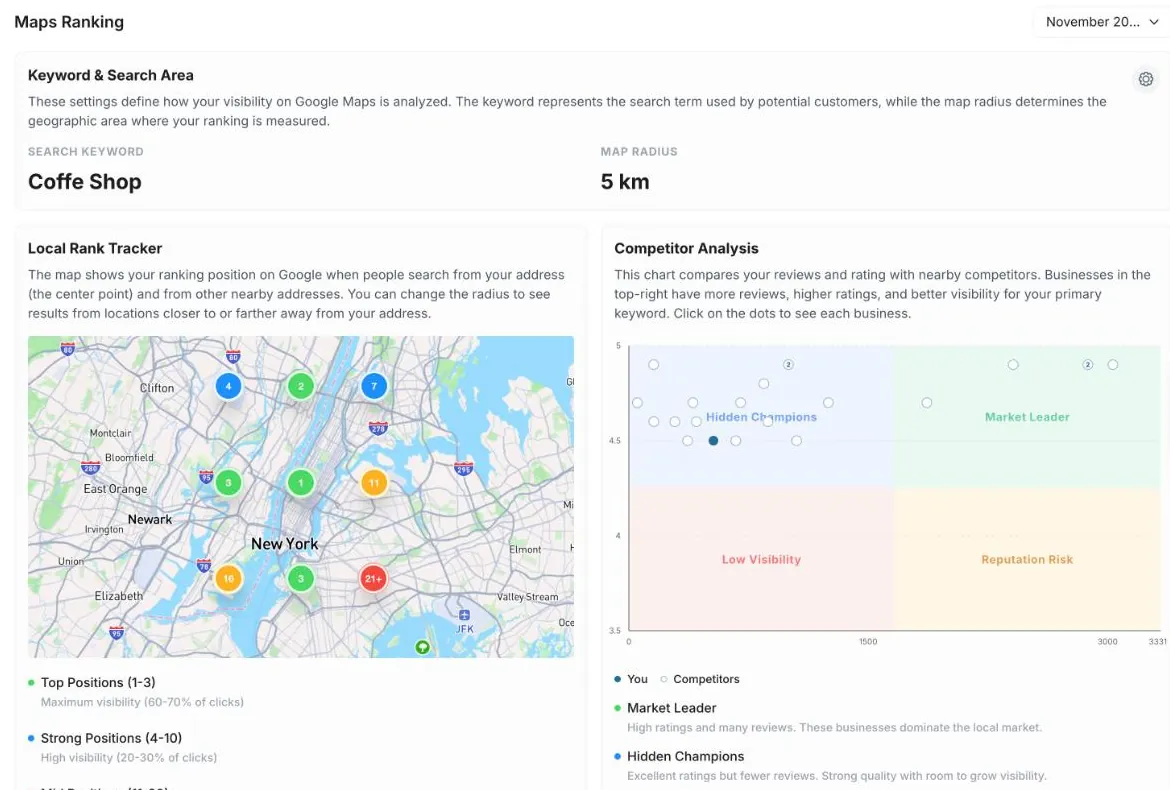
A rank grid runs the same search from dozens of points spread around your address, for example a 5 by 5 grid over a 3 km radius, and colours each point by your position there. In one look you see where you win, where you drop off the map pack and where a competitor owns the area. Run it monthly and the colours tell you whether your work is paying off.
Localena includes a rank grid in its reputation insights: pick a keyword and a radius, and the grid is checked for you on a schedule, with a competitor chart next to it. If you prefer to do it by hand, Methods 1 and 2 are the manual version of the same idea.
What to track each month
- Two or three keywords that match how customers search. Not twenty. Your main service plus your town is usually enough.
- Share of green. How many grid points put you in the top 3. This number moving up is the whole game.
- The nearest competitor in the areas where you are orange or red. Look at their review count, rating and categories.
- Review count and rating, because they feed prominence, the one factor you can grow every week. Our rating calculator shows how many reviews move your average.
What actually moves the number
Google is open about the three factors. Here is what each one means in practice:
- Relevance: the right primary category, services listed in plain words, an accurate description, photos and regular posts. Work through the Business Profile checklist once, properly.
- Distance: you cannot change it, and you should never fake an address or open profiles at places where you have no staff. Google's profile guidelines explain what is allowed.
- Prominence: review count, rating, how recent your reviews are, replies, and mentions of your business on other websites. A steady flow of genuine reviews from every customer, as described in how to get more Google reviews, is the most reliable lever a small business has.
Two things do not help: stuffing keywords into your business name (against the guidelines, and a common reason for suspensions) and buying reviews or asking only happy customers for them (against the review policy, and reviews get removed). See what is review gating.
Questions owners ask
Why am I number one on my phone but my customer cannot find me?
Your phone knows where you are, probably at your business, and knows you visit your own profile. Your customer is somewhere else and has never seen you. Test from their side of town in an incognito window, or run a grid.
How often should I check?
Once a month is enough for most businesses. Rankings move slowly, and checking daily only shows noise. Pick the same keywords and the same radius each time so the results compare.
Does a rank grid show the same results my customers see?
Close, but not identical. A grid searches as a signed-out user from each point. A real customer may be signed in and have history, which can nudge the list. The grid is the fair, repeatable version.
Which radius should I use?
The distance customers really travel to you. A coffee shop might use 1 to 2 km, a dentist 5 km, a roofer 20 km or more. A too-large radius makes everything look red and hides your real neighbourhood.
My rank dropped this week. What happened?
Usually one of three things: a competitor added reviews or fixed their profile, Google changed your primary category or hours after a suggested edit you did not notice, or the check was made from a different point. Confirm your profile basics first, then compare the same grid a month later before drawing conclusions.
Does my website matter for Maps ranking?
Yes, as part of prominence and relevance. A page that names your services and your area, loads fast and links to your Business Profile supports the listing. It is not a substitute for reviews and a complete profile.
Last updated 21 November 2026. Google changes its screens and policies; when something here no longer matches what you see, Google's own help pages are the reference.